

カレンダーの作成
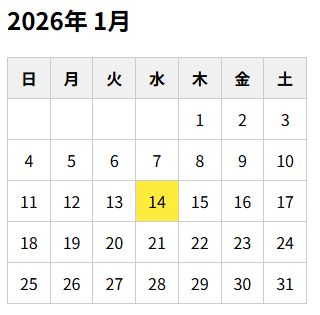
コード
index.html
<!DOCTYPE html>
<html lang="ja">
<head>
  <meta charset="UTF-8">
  <meta name="viewport" content="width=device-width, initial-scale=1.0">
  <title>Document</title>
  <link rel="stylesheet" href="./style.css">
  <script src="./script.js"></script>
</head>
<body>
  <h2 id="month"></h2>
  <table id="calendar">
    <thead>
      <tr>
        <th>日</th><th>月</th><th>火</th><th>水</th>
        <th>木</th><th>金</th><th>土</th>
      </tr>
    </thead>
    <tbody></tbody>
  </table>
</body>
</html>
script.js
window.onload = function() {
  const today = new Date();
  const year = today.getFullYear();
  const month = today.getMonth() + 2; // 0〜11

  const monthTitle = document.getElementById('month');
  const tbody = document.querySelector('#calendar tbody');

  // 月タイトル
  monthTitle.textContent = `${year}年 ${month + 1}月`;

  // 月初の曜日(0:日〜6:土)
  const firstDay = new Date(year, month, 1).getDay();
  console.log(firstDay); // 4(2026年1月の最初は曜日は木曜のため4を取得)

  // 月末の日付
  const lastDate = new Date(year, month + 1, 0).getDate();
  console.log(lastDate); // 31

  // 1週間分のtdを格納するtrタグの作成
  let row = document.createElement('tr');

  // 空白セル(前月分)
  // 0 ~ 3まで繰り返すため作成されるtdタグは4つ作成
  for (let i = 0; i < firstDay; i++) {
    row.appendChild(document.createElement('td'));
  }

  // 1 ~ 31 まで繰り返すためtdタグが31個作成
  for (let day = 1; day <= lastDate; day++) {
    const cell = document.createElement('td');
    cell.textContent = day;

    // 今日を強調表示
    if (year === today.getFullYear() &&  month === today.getMonth() && day === today.getDate()) {
      cell.classList.add('today');
    }

    row.appendChild(cell);

    // 土曜日で改行
    // 1週間分の行が完成したらtbodyに追加し、次の週用のtrを作成する
    if ((firstDay + day) % 7 === 0) {
      tbody.appendChild(row);
      row = document.createElement('tr');
    }
  }

  // 残り行を追加
  tbody.appendChild(row);

}
style.css
table {
  border-collapse: collapse;
  width: 300px;
}
th, td {
  border: 1px solid #ccc;
  text-align: center;
  padding: 8px;
}
th {
  background: #f0f0f0;
}
.today {
  background: #ffeb3b;
}
Javascript の説明
2026/1 のデータで解説しています。
以下のコードは、現在の日付が土曜日にあたり、1週間分のセルがそろった場合、その週の <tr> 要素を <tbody> に追加し、次の週を作成するために新しい <tr> 要素を生成して変数 row に代入している。
if ((firstDay + day) % 7 === 0) {
  tbody.appendChild(row);
  row = document.createElement('tr');
}
月末の日付以降のtdタグも作成
// 残り行を追加
tbody.appendChild(row);
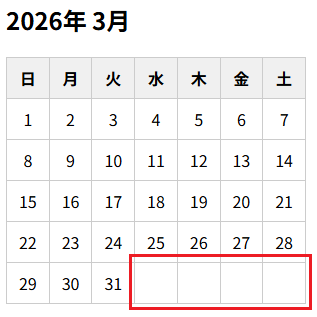
上記のコードの前に、コードを追加します。コードを以下のように編集します。
// 最終行が土曜日で終わっていない場合
const remaining = (firstDay + lastDate) % 7;

if (remaining !== 0) {
  // 土曜日まで空セルを追加
  for (let i = remaining; i < 7; i++) {
    row.appendChild(document.createElement('td'));
  }
}

// 残り行を追加
tbody.appendChild(row);
上記のコードを追加すると、以下の赤の四角で囲んだように月末日以降も土曜日までtdタグが追加されます。
以下のようなコードでも実装可能です。
const endDay = (firstDay + lastDate) % 7;

if (endDay !== 0) {
  while (row.children.length < 7) {
    row.appendChild(document.createElement('td'));
  }
}

tbody.appendChild(row);
前月・当月・翌月の日付をすべて表示し、前月/翌月は薄く表示するカレンダー
前月・当月・翌月の日付をすべて表示し、前月/翌月は薄く表示するカレンダーを作成するには、javascriptとcssを以下のように変更します。
script.js
window.onload = function() {
  const today = new Date();

  const year = today.getFullYear();
  const month = today.getMonth(); // 0〜11

  const monthTitle = document.getElementById('month');
  const tbody = document.querySelector('#calendar tbody');

  // 表示月タイトル
  monthTitle.textContent = `${year}年 ${month + 1}月`;

  // 今月1日の曜日
  const firstDay = new Date(year, month, 1).getDay();

  // 今月の日数
  const lastDate = new Date(year, month + 1, 0).getDate();

  // 前月の日数
  const prevLastDate = new Date(year, month, 0).getDate();

  let row = document.createElement('tr');

  //
  // ① 前月の日付
  //
  for (let i = firstDay - 1; i >= 0; i--) {
    const cell = document.createElement('td');
    cell.textContent = prevLastDate - i;
    cell.classList.add('other-month');
    row.appendChild(cell);
  }

  //
  // ② 当月の日付
  //
  for (let day = 1; day <= lastDate; day++) {
    const cell = document.createElement('td');
    cell.textContent = day;

    // 今日を強調
    if (
      year === today.getFullYear() &&
      month === today.getMonth() &&
      day === today.getDate()
    ) {
      cell.classList.add('today');
    }

    row.appendChild(cell);

    // 土曜日で行確定
    if ((firstDay + day) % 7 === 0) {
      tbody.appendChild(row);
      row = document.createElement('tr');
    }
  }

  //
  // ③ 翌月の日付
  //
  const endDay = (firstDay + lastDate) % 7;
  let nextMonthDay = 1;

  if (endDay !== 0) {
    for (let i = endDay; i < 7; i++) {
      const cell = document.createElement('td');
      cell.textContent = nextMonthDay++;
      cell.classList.add('other-month');
      row.appendChild(cell);
    }
  }

  // 最終行を追加
  tbody.appendChild(row);

}
style.css
table {
  border-collapse: collapse;
  width: 300px;
}
th, td {
  border: 1px solid #ccc;
  text-align: center;
  padding: 8px;
}
th {
  background: #f0f0f0;
}
.other-month {
  color: #aaa;
}
.today {
  background: #ffeb3b;
}
祝日判定も追加する
script.js
window.onload = function() {
  const today = new Date();

  const year = today.getFullYear();
  const month = today.getMonth(); // 0〜11

  const monthTitle = document.getElementById('month');
  const tbody = document.querySelector('#calendar tbody');

  const holidays = {
    "2026": [
      { date: '2026-01-01', name: '元日' },
      { date: '2026-01-12', name: '成人の日' },
      { date: '2026-02-11', name: '建国記念の日' },
      { date: '2026-02-23', name: '天皇誕生日' }
    ]
  }

  const yearStr = String(year); // 表示中の年
  const holidayMap = new Map();

  if (holidays[yearStr]) {
    holidays[yearStr].forEach(h => {
      holidayMap.set(h.date, h.name);
    });
  }

  // 表示月タイトル
  monthTitle.textContent = `${year}年 ${month + 1}月`;

  // 今月1日の曜日
  const firstDay = new Date(year, month, 1).getDay();

  // 今月の日数
  const lastDate = new Date(year, month + 1, 0).getDate();

  // 前月の日数
  const prevLastDate = new Date(year, month, 0).getDate();

  let row = document.createElement('tr');

  //
  // ① 前月の日付
  //
  for (let i = firstDay - 1; i >= 0; i--) {
    const cell = document.createElement('td');
    cell.textContent = prevLastDate - i;
    cell.classList.add('other-month');
    row.appendChild(cell);
  }

  //
  // ② 当月の日付
  //
  for (let day = 1; day <= lastDate; day++) {
    const cell = document.createElement('td');
    cell.textContent = day;

    const dateKey = `${year}-${String(month + 1).padStart(2, '0')}-${String(day).padStart(2, '0')}`;

    // 祝日判定
    if (holidayMap.has(dateKey)) {
      cell.classList.add('holiday');
      cell.title = holidayMap.get(dateKey); // ホバーで祝日名表示
    }

    const weekDay = (firstDay + day - 1) % 7;

    // 日曜・土曜の色分け
    if (weekDay === 0) {
      cell.classList.add('sunday');
    } else if (weekDay === 6) {
      cell.classList.add('saturday');
    }

    // 今日の強調
    if (
      year === today.getFullYear() &&
      month === today.getMonth() &&
      day === today.getDate()
    ) {
      cell.classList.add('today');
    }

    row.appendChild(cell);

    if ((firstDay + day) % 7 === 0) {
      tbody.appendChild(row);
      row = document.createElement('tr');
    }
  }

  //
  // ③ 翌月の日付
  //
  const endDay = (firstDay + lastDate) % 7;
  let nextMonthDay = 1;

  if (endDay !== 0) {
    for (let i = endDay; i < 7; i++) {
      const cell = document.createElement('td');
      cell.textContent = nextMonthDay++;
      cell.classList.add('other-month');
      row.appendChild(cell);
    }
  }

  // 最終行を追加
  tbody.appendChild(row);

}